Choose your reference.
Browse 74 bundled openings across all nine matchups, plus PvX, ZvX, and TvX general guides. Check source dates and patch caveats, search a player, and keep your favorites together.
Meet PhiForge 1.2.0. Your StarCraft II build library, replay review, and customizable desktop coach. Formerly Opening, with your saved builds and history kept intact.
Free web coach · $1 USD once for Mac + Windows · No subscription
A LITTLE STRUCTURE GOES A LONG WAY
Choose an opening.
Build the habit.
Browse 74 bundled openings across all nine matchups, plus PvX, ZvX, and TvX general guides. Check source dates and patch caveats, search a player, and keep your favorites together.
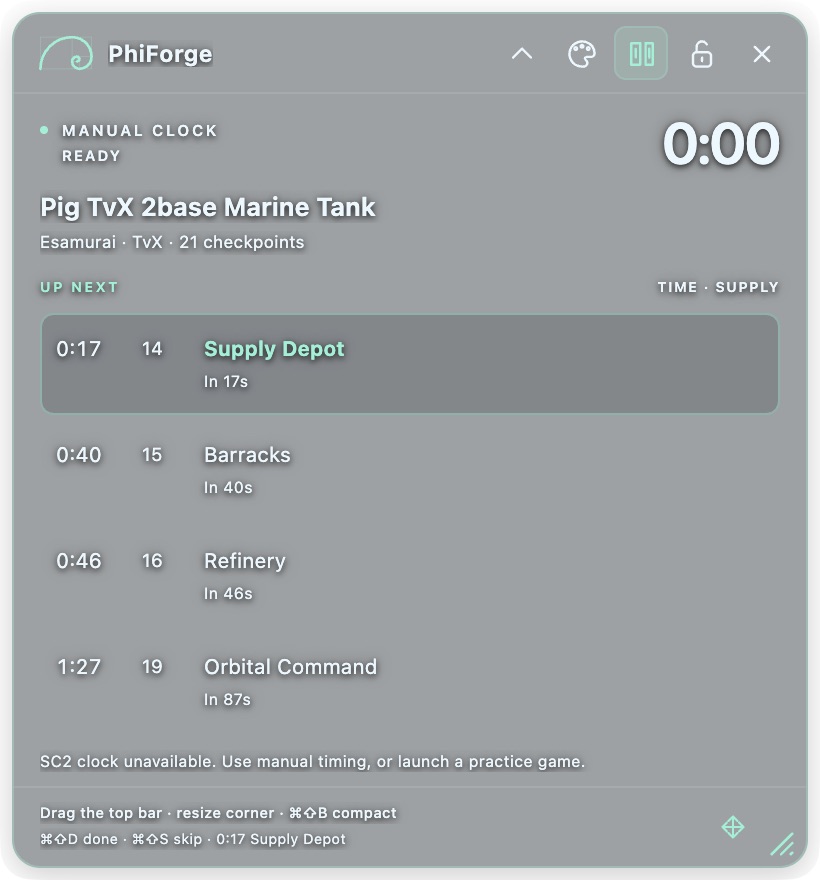
Follow timed opening checkpoints with race-specific coaching. Added coaching reminders are labeled so you can tell them apart from source build actions.
Drag the desktop coach, resize it with its grip, or collapse it to a compact bar. Adjust background transparency, text size, and colors, then lock clicks through to the game.
Open a supported .SC2Replay file and choose your player. Review observed build and economy data, composition suggestions, and possible attack windows. Parsing happens locally; suggestions are not guaranteed tactics.
Choose an original Comms chirp, Crystal ping, or Warp pulse. Preview the sound and set its volume. Optional sound cues are off by default.
Mark each practice step as you complete it, then review your self-reported timing. Import your own builds and export a backup of your progress.
THE GAME CLOCK, WHEN AVAILABLE
The desktop companion can follow the clock from SC2’s local client interface. When it is unavailable, switch to manual timing and keep practicing.
The clock helps with timing. It does not detect completed units or buildings. You mark the checkpoints; your report reflects those marks.
Windowed or borderless mode is recommended for the overlay.PICK YOUR PRACTICE SPACE
Start free in your browser.
Get both desktop apps for $1 USD.
Browse builds, review a replay locally, and practice with a manual timer beside your game.
Open free web app Free library and browser practice. No purchase needed.A customizable transparent coach, compact mode, global shortcuts, and optional SC2 clock sync.
Get both apps · $1 USD Included with Windows in the same purchase. Unzip, then open PhiForge.app.The same customizable coach in a portable package. Keep its full folder together.
Get both apps · $1 USD Included with Mac in the same purchase. Extract the full folder, then run PhiForge.exe.Stripe checkout may display Scope Mesa, operated by SteadyForth LLC.
The Mac interface has been tested. Windows runtime and live SC2 integration still need validation. The Windows build is unsigned; the Mac build is not Developer ID signed or notarized. Your operating system may show an approval prompt.
One payment of $1 USD includes both desktop downloads: Mac Apple silicon and Windows x64. There is no subscription. The web build library and browser practice remain free. After payment, save your recovery code so you can restore download access later.
The library combines sourced replay references and community guides, with universal openings for each race. The pro catalogue is scheduled to refresh daily at 5:00 AM Eastern, but a new sync does not make an older replay current. Check the source date and patch caveats before practicing.
No. Live practice shows prompts and tracks the times you manually mark. It does not play StarCraft II or automatically verify completed actions during a game. Post-game replay review separately reads observed events from a replay file you choose.
Press Cmd+Shift+M on Mac or Ctrl+Shift+M on Windows to unlock and focus the HUD. Drag its header or resize with the bottom corner grip. Use Appearance to change opacity, text size, and colors. Cmd/Ctrl+Shift+B switches compact mode. Your settings and position are saved.
No. Supported replay files are decoded on your device. The review separates observed events from inferred suggestions. Unsupported formats show an explanation; the review does not reconstruct every movement, scouting decision, or moment of control.
Windowed or borderless mode is recommended. Overlay visibility and the local game clock depend on your operating system and installed SC2 version. Live SC2 behavior still needs validation.
Favorites, imported builds, settings, and recent attempts are stored locally. Browser and desktop storage are separate. Use Export my data, then import the backup where you want to practice.
PhiForge is an independent fan-made practice companion from Steady Forth LLC. It is not affiliated with Blizzard Entertainment or Spawning Tool.